 seimi-render#
📖 Documentation languages: 简体中文 | English
A Chromium-based web rendering service. Submit a URL and seimi-render loads the page with a real Chromium browser (executing JS, waiting for async content), then returns the fully rendered HTML, PDF, PNG, or structured JSON search results. Results can be fetched via long polling or WebSocket push. Runs silently in the background. Supports the MCP protocol, making it a perfect fit for AI agent tools — extending your harness's data-acquisition reach. It can also serve as the underlying infrastructure for AI-driven reinforcement-learning iteration during vibe coding.
This project is the modern successor to SeimiAgent.
Features#
- Real browser rendering — Built on QtWebEngine (Chromium); supports JS rendering (Ajax), SPAs, and dynamic content.
- HTTP API — Remote admin UI; submit tasks, query status, and long-poll for results (html / markdown / pdf / image).
- WebSocket push — Real-time notification when rendering completes, so you can freely compose any workflow.
- MCP protocol support — Built-in MCP server (port 8090); ZCode / Codex / Claude Code / Cursor and other agents can plug in directly to drive rendering. Unlimited web data reading or search-engine power for your agent.
- Bundled Chrome extension — Syncs cookie state 1:1 with your own Chrome, so agents and other automation scenarios quickly inherit and keep a consistent login state.
- Login-state persistence — Cookies are encrypted to disk (
data/cookies.dat) and automatically restored on service restart, so you don't have to re-sync. - Runtime proxy hot-swap —
--proxy/POST /proxylets you change the upstream proxy at any time without restarting; you can extend this with your own proxy pool to fully dodge IP rate-limiting. - Built-in web admin console — Monitoring dashboard, render test bench, cookie management, API docs, one-click Agent-config copy.
- Structured search-engine result extraction — Baidu / Bing / Google results are de-ads'd and structured into JSON.
- Runtime metrics — Success rate, latency percentiles (p50/p90/p99), throughput, per-domain distribution — fit for an ops dashboard.
- Network recording & HAR export — Start with
--remote-debugging-port, then passrecord_network=trueon a render to capture the full page-load traffic (requests/responses/headers/response bodies/timing — equivalent to Chrome DevTools' Network tab), producing a standard HAR 1.2 file you can import into Chrome DevTools / Charles / haralyzer for analysis. - Multiple render outputs — html, markdown, pdf, png/jpg, and structured search-result JSON.
- Headless — Defaults to the offscreen platform; no display needed, won't disturb your local browser, and your local activity won't disturb result capture.
- Basic anti-fingerprinting — Baseline anti-bot-evasion capability.
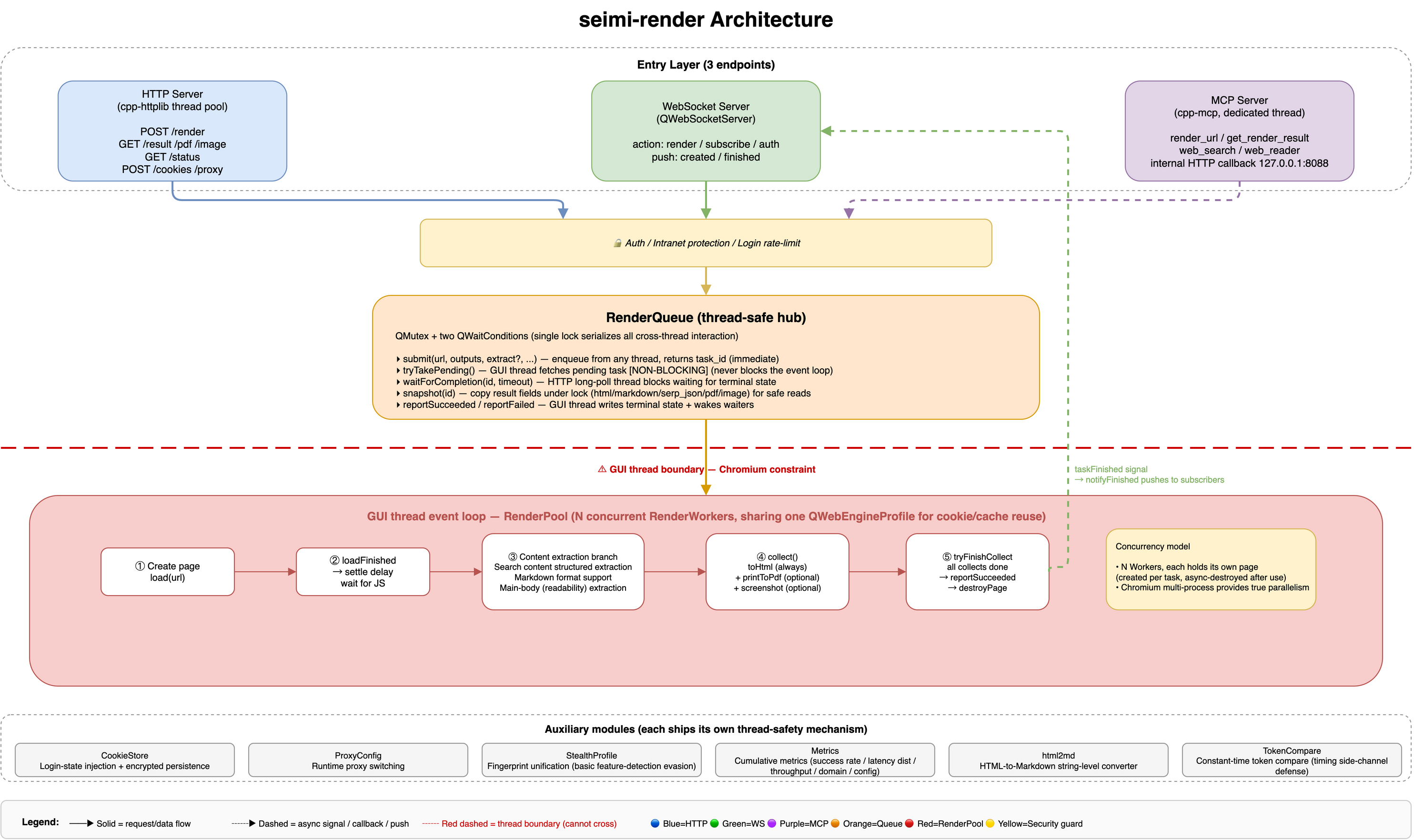
Architecture#
Build & Run#
Install dependencies#
| Platform | Command |
|---|---|
| Windows | scripts\setup-windows.bat |
| Linux | sh scripts/setup-linux.sh |
| macOS | sh scripts/setup-macos.sh |
Build & package#
| Platform | Command |
|---|---|
| Windows | scripts\package-windows.bat |
| Linux | sh scripts/package-linux.sh |
| macOS | sh scripts/package.sh |
Quick Start#
Start the service (headless offscreen by default):
macOS#
build/seimi-render.app/Contents/MacOS/seimi-render --http-port 8088 --ws-port 8089Example: use with an AI tool#
Standard, general-purpose MCP config:
{
  "mcpServers": {
    "seimi-render": {
      "type": "http",
      "url": "http://127.0.0.1:8090/mcp"
    }
  }
}
Note: if you start the service with a password, you must add authorization info. You can copy it directly from the Config Example tab in the admin console.
Expected behavior with an AI tool#
Once seimi-render is connected to an AI agent client over MCP, the agent can drive the whole pipeline — "render a page → extract the main text → structured analysis" — in natural language, without you writing URLs or parsing HTML. The table below shows a few real usage scenarios (screenshots from actual agent sessions). On top of seimi-render you can freely build any data-scraping and analysis workflow — stock sentiment, historical K-line analysis, and so on. These are simple demos; for complex tasks you can author a custom Skill that uses seimi-render as the data-acquisition backbone to build the closed-loop data workflow you want.
| Scenario | Description | Screenshot (click to enlarge) |
|---|---|---|
| Natural-language-driven rendering | In an agent client like ZCode, the user describes a need in one sentence (e.g. "I want to know which hospitals in Beijing are reliable for dental implants"). The agent plans and calls mcp__seimi-render__browser_search, waits synchronously for structured search results, and — if it decides more detail is needed — calls get_web_content to fetch the full page. |  |
| Structured search output | Calling browser_search returns structured search results, easy for the agent to process and understand. | 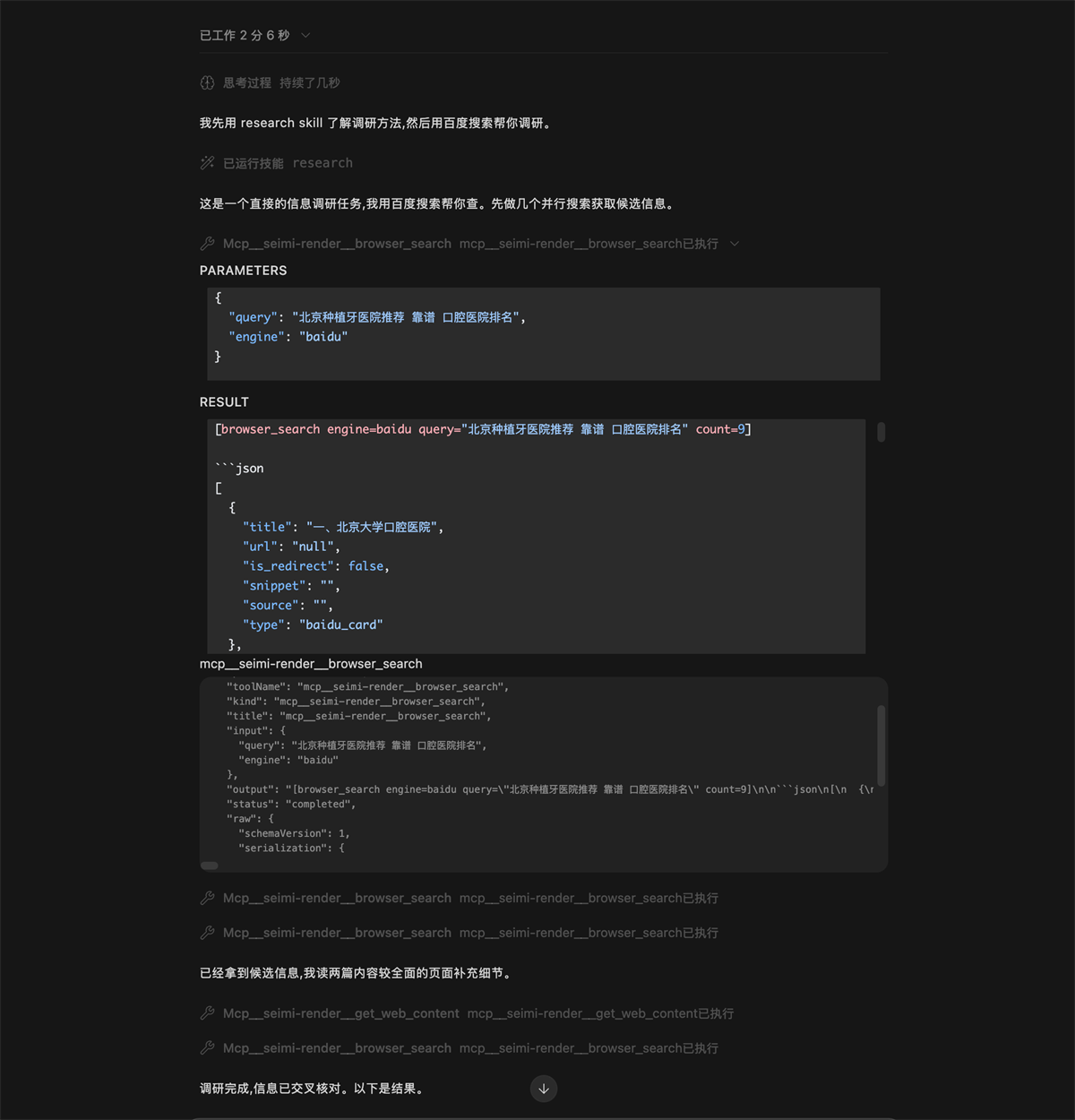 |
| Multi-step iteration | For complex needs the agent breaks the task into steps: render the target page → read the structured result → render related pages or call search-engine extraction (Baidu/Bing/Google SERP) → synthesize the output. The image shows a full chain of multiple MCP tool calls + intermediate reasoning within a single session. | 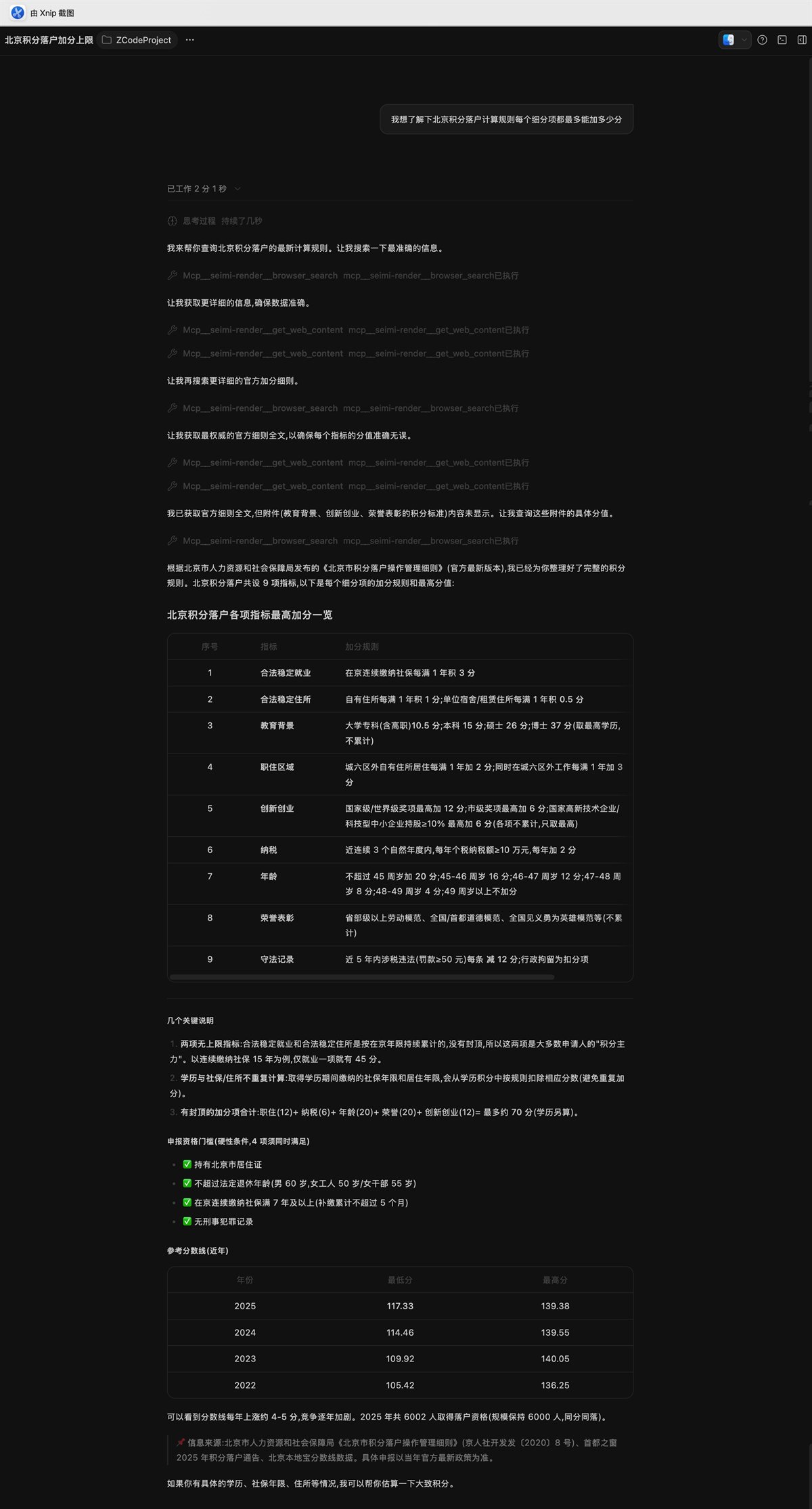 |
How to connect is described in Example: use with an AI tool above; the config JSON can be one-click copied from the Config Example tab in the admin console. The
mcp__seimi-render__*tool names in the screenshots correspond to therender_url/get_render_resulttools exposed byMcpServer(see the MCP group under the API docs tab).
Manual integration / build your own client#
One command to render https://www.sohu.com/ and get the HTML (submit + long-poll combined):
curl -X POST http://localhost:8088/render \
  -H "Content-Type: application/json" \
  -d '{"url":"https://www.sohu.com/","settle_ms":2500,"long_poll_ms":35000}'
Response (formatted, HTML abbreviated):
{
  "task_id": "a3f1...",
  "url": "https://www.sohu.com/",
  "state": "succeeded",
  "elapsed_ms": 8550,
  "html": "<!DOCTYPE html><html lang=\"zh-CN\"><head><title>搜狐</title>..."
}
Measured: rendering the Sohu homepage (https://www.sohu.com/) took ~8.5s, returned ~220KB of HTML with 44 <script> tags and 406 links, title "搜狐" — i.e. the full DOM after Chromium finished executing JS.
Command-line arguments#
| Argument | Default | Description |
|---|---|---|
--http-port <n> | 8088 | HTTP service port |
--ws-port <n> | 8089 | WebSocket service port |
--mcp-port <n> | 8090 | MCP (Model Context Protocol) HTTP port, for Claude Code / Cursor and other agents |
--host <addr> | 127.0.0.1 | Bind address; use 0.0.0.0 to expose externally |
--concurrency <n> | 3 | Number of WebEngine render slots (see Concurrency & throughput) |
--http-threads <n> | 8 | HTTP worker thread count |
--settle-ms <n> | 2000 | Default JS settle delay, ms to wait for JS execution after loadFinished (0–30000) |
--load-timeout-ms <n> | 20000 | Total per-task timeout (ms) |
--windowed | offscreen | Force a native-window QPA platform; offscreen headless mode is the default |
--no-sandbox | off | Disable the Chromium sandbox; often needed under WSL2 / containers / root |
--sandbox | off | Force-enable the Chromium sandbox (overrides the root auto-detection) |
--verbose-chromium | off | Show Chromium / web-console logs (known noise is filtered by default) |
--password <pw> | — | Admin password. (Insecure: visible in plaintext via ps/process lists; the two options below are preferred) |
--password-file <f> | — | Read the password from the first line of a file (recommended) |
SEIMI_PASSWORD env var | — | Read the password from the environment variable (recommended). Priority: --password > --password-file > SEIMI_PASSWORD. Unset = no password, open access |
--no-admin | off (admin on) | Disable the built-in admin UI; by default GET / serves the console |
--trusted-proxy <list> | — | Comma-separated trusted reverse-proxy IPs/CIDRs (e.g. 10.8.0.0/16,127.0.0.1). When set, /api/login rate-limiting is based on the real client IP extracted from X-Forwarded-For; otherwise the TCP peer address is used (XFF ignored, to prevent spoofing) |
--proxy <url> | — | Upstream proxy for all Chromium traffic. Format http://[user:pass@]host:port or socks5://[user:pass@]host:port. Set via QNetworkProxy::setApplicationProxy; supports runtime POST /proxy hot-swap without restart. type=direct clears it |
--no-stealth | off (stealth on) | Disable browser fingerprint unification. Stealth is on by default, disguising every render instance as the same Chrome desktop environment (UA/screen/WebGL/canvas) to blend into the crowd and evade basic anti-bot detection (e.g. Google) |
--no-warmup | off (warmup on) | Disable startup Google session warm-up. On by default: at startup the service loads --warmup-url once in a hidden page (default https://www.google.com/) to acquire NID/CONSENT session cookies, then starts the dispatch timer to serve business requests — a cold start with zero cookies hitting /search directly is Google's highest-risk window for triggering a sorry page, and warm-up significantly lowers the sorry probability on the first search |
--warmup-url <url> | https://www.google.com/ | Warm-up target URL (must be http/https). Only used when warm-up is on; usually no need to change it. In special environments (e.g. google.com unreachable through your proxy) you can swap in a mirror that reliably returns google-domain cookies. Warm-up has built-in failure adaptation: 3 consecutive warm-up failures (about 90min, Google unreachable) auto-suspend the 30min cycle and switch to a 5min low-frequency probe; on probe success it immediately resumes the normal cycle. State changes are logged as [warmup] SUSPENDED / [warmup] RESUMED |
--remote-debugging-port <n> | — (off) | Enables the Chromium remote-debugging port, turning on HAR network recording (see Network recording & HAR export). When set, stealth's AutomationControlled flag is automatically skipped (debug mode and anti-bot are mutually exclusive), and a prominent warning is printed. Do not expose this port in production — it grants full browser control |
--data-dir <path> | <binary_dir>/data | Data directory for persistence (cookies.dat encrypted cookies / seimi.key machine-bound salt / metrics.json cumulative metrics). Required for containerized or read-only deployments where the binary directory isn't writable |
--help | — | Show help |
Concurrency & throughput (--concurrency)#
--concurrency is the core throughput knob: each render slot is an independent QWebEnginePage sharing a single GUI-thread event loop, with real CPU/network parallelism provided by Chromium's internal multi-process model. More slots = more concurrent tasks = higher overall throughput — up to an inflection point.
Measured data (link pool of 80 media articles — 20 each from Sohu/NetEase/Sina/The Paper, 16-core / 32-thread machine, 2 minutes per level):
--concurrency | Throughput (req/s) | Relative gain | p50 (ms) | p99 (ms) | Success rate |
|---|---|---|---|---|---|
| 2 | 0.31 | baseline | 6125 | 9497 | 100% |
| 4 | 0.64 | +106% | 6012 | 8322 | 100% |
| 8 | 1.24 | +300% | 5984 | 8857 | 100% |
| 12 | 1.30 | +319% | 8697 | 12265 | 100% |
| 16 | 1.29 | +316% | 11757 | 17356 | 100% |
| 20 | 1.29 | +316% | 14460 | 18538 | 100% |
Browser-graphical remote admin console#
seimi-render ships with a browser-based admin console (GET / — open the root path). It bundles "view runtime status, test rendering, manage cookies, configure Agent access, browse API docs" into one web UI — usable locally or remotely, no SSH needed to curl on the server. On by default; --no-admin disables it. Supports authentication.
See the table below for each console tab:
| Tab | Purpose | Screenshot (click to enlarge) |
|---|---|---|
| Runtime stats | Monitoring dashboard: uptime, total requests/success/fail/success-rate, throughput (req/s), latency distribution (min/avg/p50/p90/p99/max), output-type demand, per-domain request volume & success rate Top-N, queue snapshot. Good for capacity planning and locating high-failure-rate sites. | 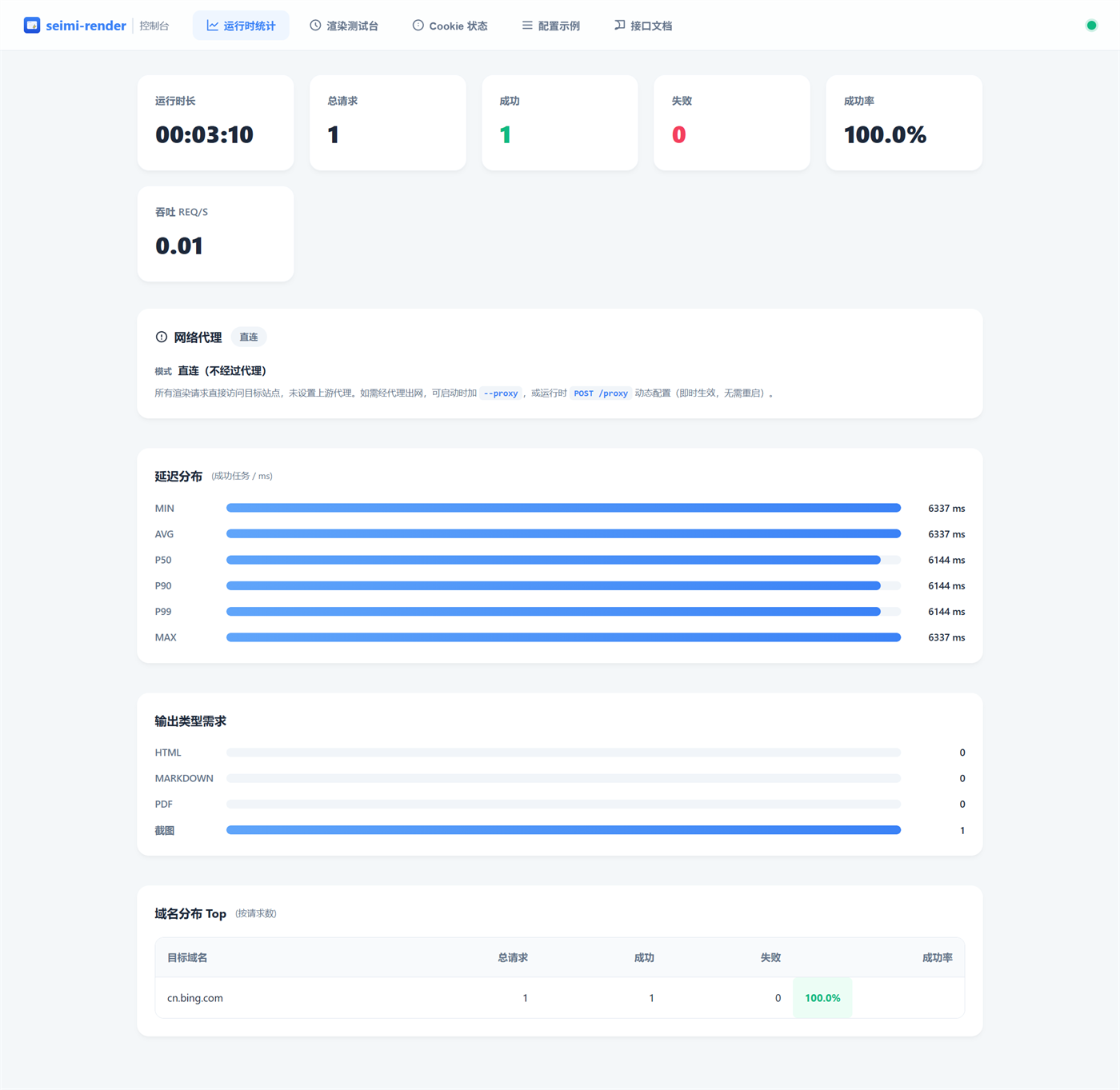 |
| Render test bench (Chinese) | Core debugging tool: enter a URL, tune settle_ms / long-poll, pick output formats (HTML/Markdown/PDF/screenshot), choose screenshot encoding and markdown algorithm, site-specific extraction (Baidu/Bing/Google SERP). The image shows Bing search results yielding 10 de-ads'd results. | 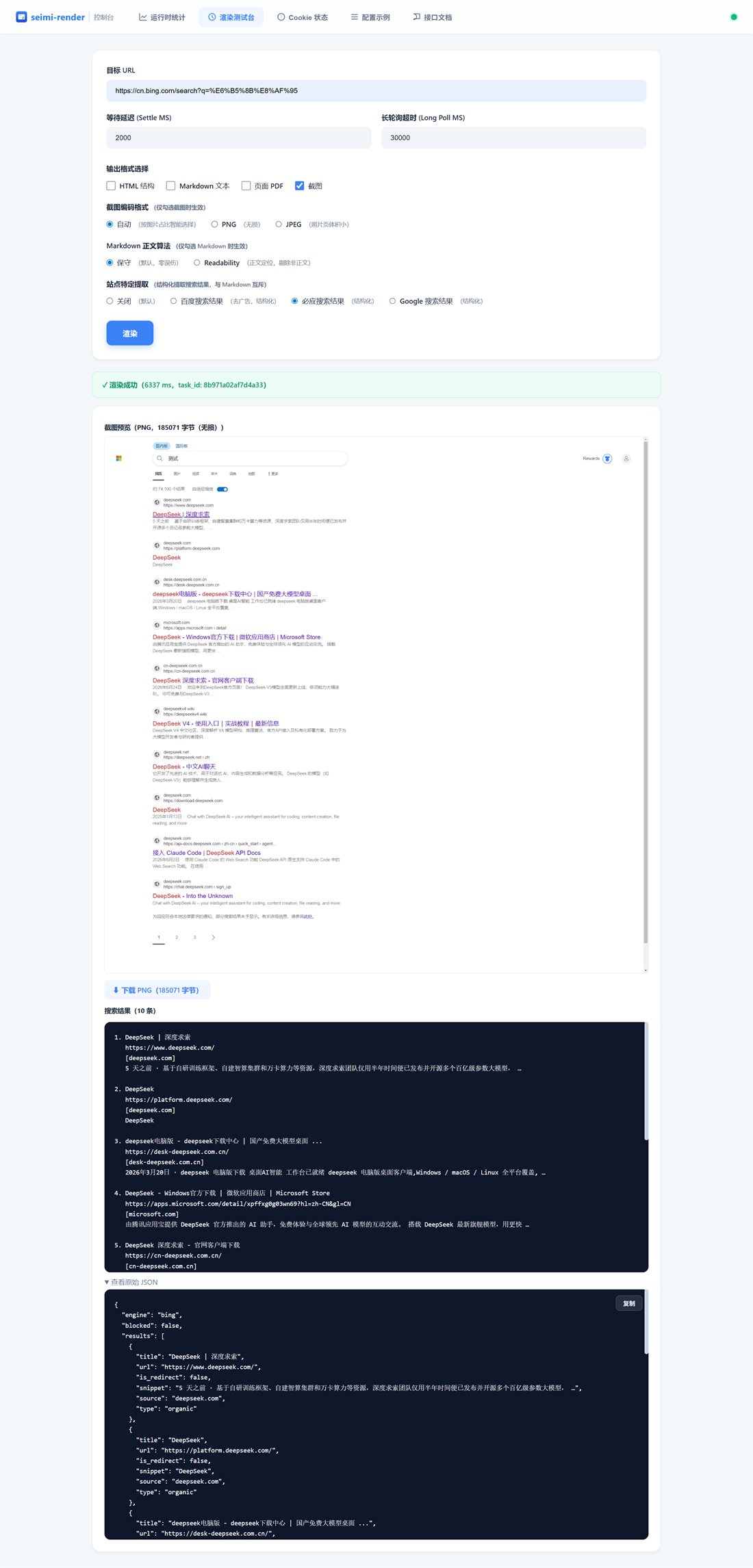 |
| Render test bench (English) | The same UI switched to English (top-right "中" toggles back to Chinese), demonstrating Google structured extraction (extract=google_serp). A direct way to verify stealth fingerprint unification end-to-end. | 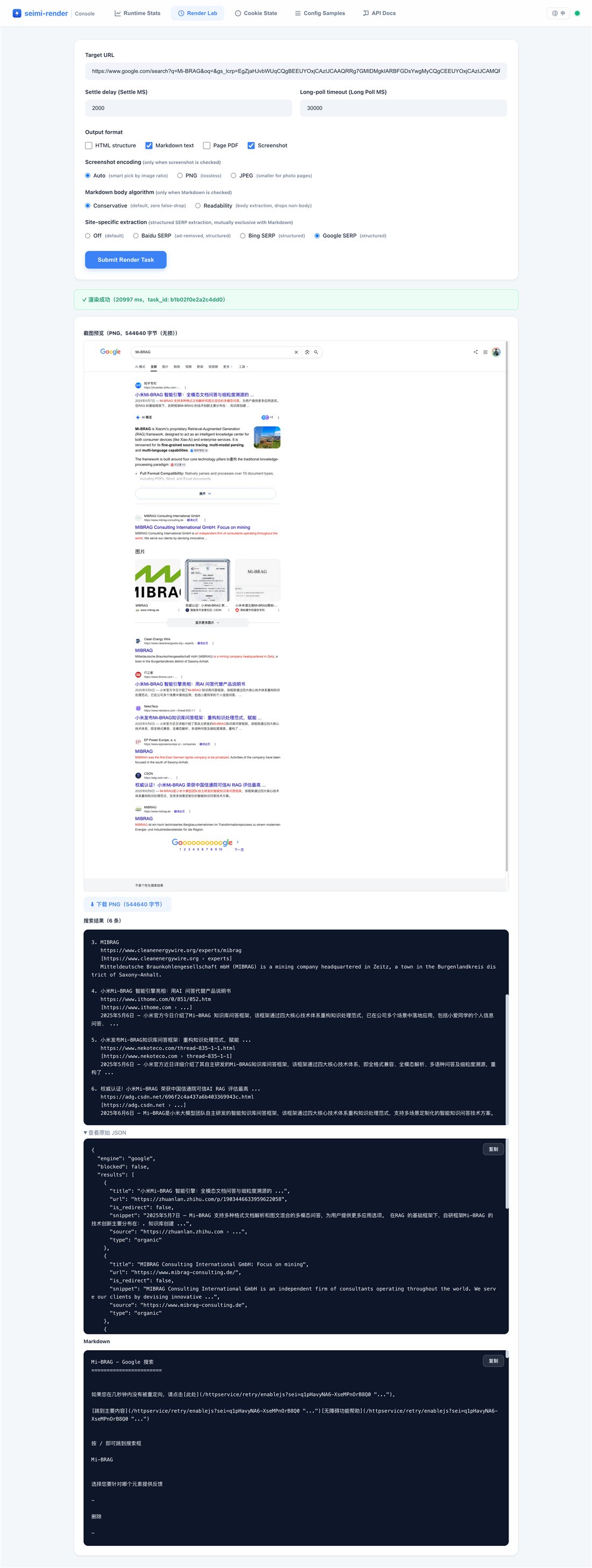 |
| Cookie status | View the login-state cookies the render service holds, shown per-domain as "cookie count carried" (no values, to prevent leakage), to reconcile with the browser extension. "Clear current session" / "Permanently delete" clear in-memory session cookies and the encrypted persistent store (data/cookies.dat) respectively. | 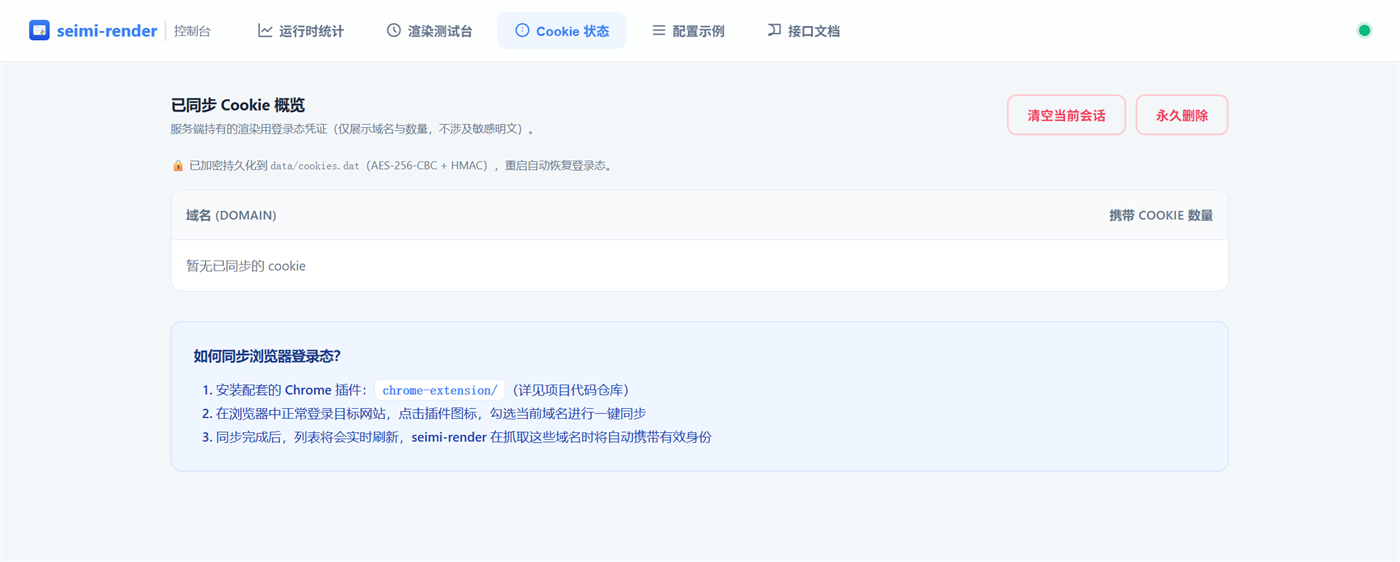 |
| Config example | One-click copy of Agent integration & invocation config: the mcpServers JSON for Claude Code / Cursor, a curl-to-/render example, a WebSocket example, and the current access token (shown when --password is enabled). | 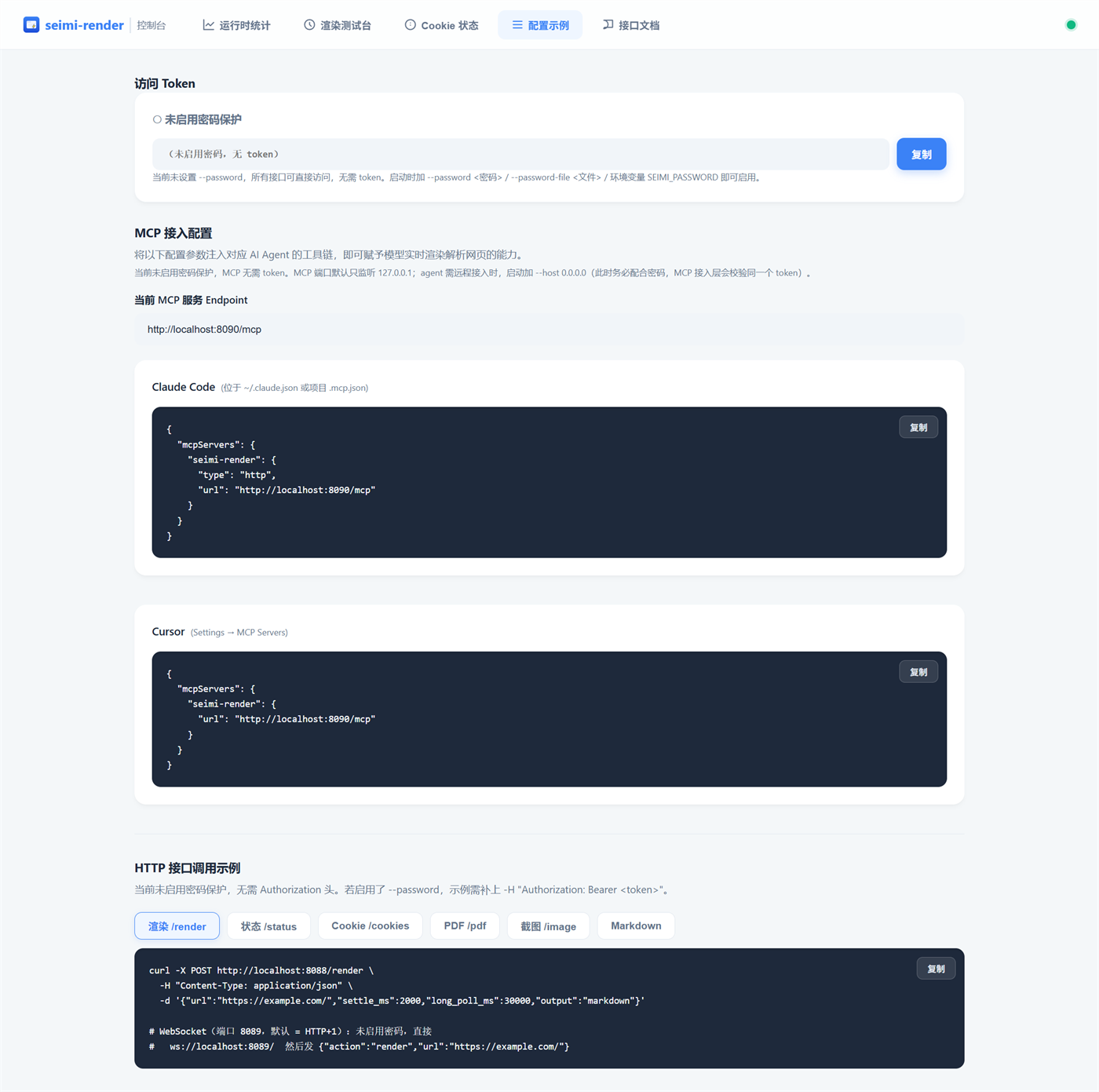 |
| API docs | Interactive API docs: the left tree groups by "HTTP REST / MCP tools / WebSocket" (17 HTTP endpoints + 5 MCP tools + WS render/subscribe/auth); the right pane has parameter tables, curl/JSON examples, response examples and error codes, all one-click copyable. | 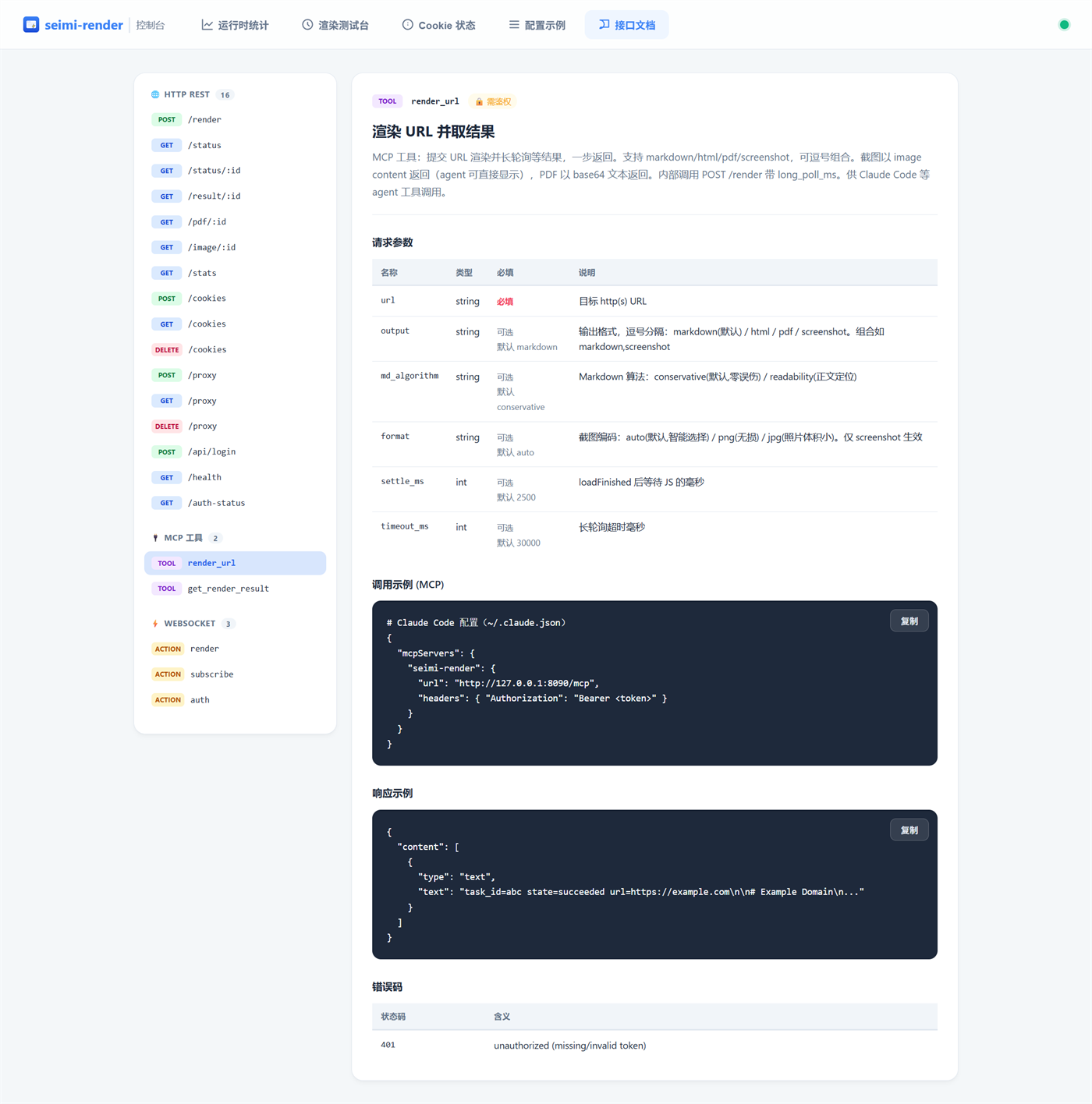 |
Cookie sync source: see Browser extension below. The admin UI is pure static assets (
admin-ui/), bundled with the binary, no external service needed. Remote access requires an explicit--host 0.0.0.0and strongly recommends configuring--password(the admin UI can change the proxy and inject cookies — it's a high-privilege entry point).
Browser extension#
seimi-render renders with a clean Chromium profile by default, carrying none of your login state. To render "login-gated" pages (personal dashboards, paid content, internal systems, login-required search results, etc.), first sync your browser's login cookies over. The bundled Chrome extension (chrome-extension/) does this in one click.
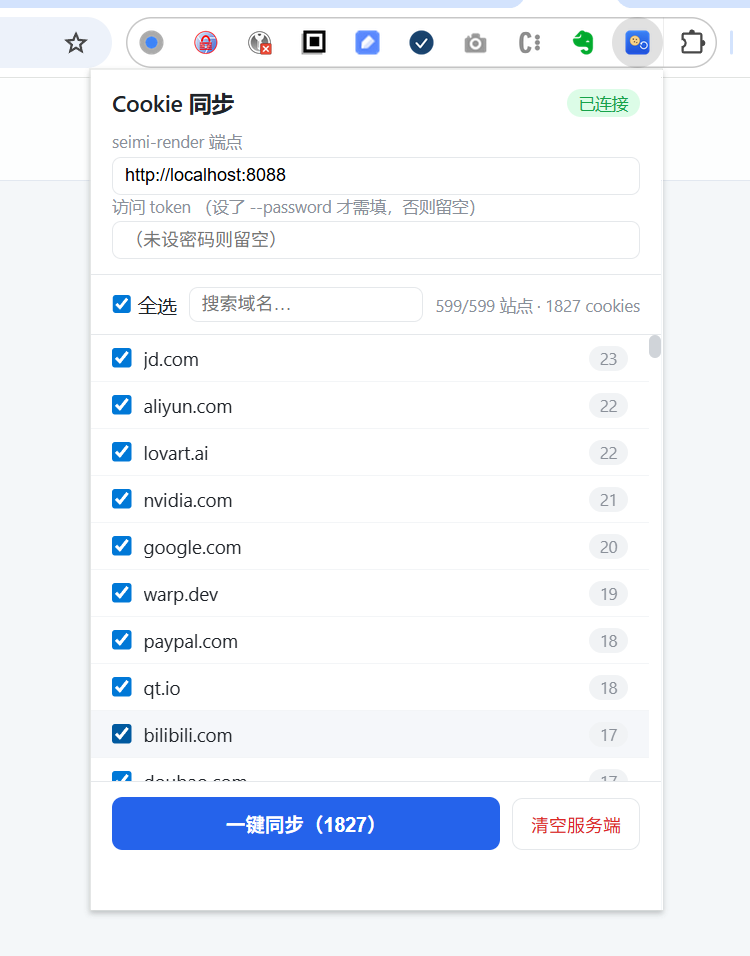
The extension reads all of the browser's cookies, aggregates them by domain, and after you check the ones you want, POSTs them in one click to seimi-render's /cookies endpoint. From then on, Chromium automatically carries the login state when rendering pages on those domains.
Install (load in developer mode)#
- Start the seimi-render service (default
http://localhost:8088). - Open
chrome://extensionsin Chrome → toggle Developer mode on (top right). - Click Load unpacked → select the
chrome-extension/directory. - A seimi-render icon appears in the toolbar — click to use.
Works on Chromium-based browsers (Chrome / Edge / Brave, MV3). Firefox uses different API names and needs its own adaptation.
Usage demo#
- Click the toolbar icon → the popup auto-reads all browser cookies and shows them aggregated by domain.
- At the top, confirm the seimi-render endpoint (default
http://localhost:8088, remembered); if--passwordis set, enter the corresponding token under "access token". - The top-right badge shows connection status (green "connected" / "not connected" / "checking"), confirming the extension can reach the service.
- At the top, confirm the seimi-render endpoint (default
- Filter domains to sync:
- "Select all" at the top toggles all on/off.
- The search box filters by keyword (locates a domain in seconds even among hundreds).
- The list is sorted by cookie count descending — heavy-login-state sites rank first (e.g. in the screenshot
jd.com 23,aliyun.com 22). - All are selected by default; it's recommended to check only the domains you need (don't pour sensitive sessions like banking/email in).
- Click the blue "Sync (N)" button → the extension POSTs the selected domains' cookies in bulk to
/cookies, then auto-reconciles, showing "synced N cookies (server has M total)" — N==M means success. - From then on seimi-render auto-carries the login state when rendering pages on those domains.
The "Clear server" button = one-click
DELETE /cookiesto wipe the synced cookies on seimi-render (handy when switching accounts / debugging).
View server-side synced cookies#
After syncing, you can view the cookies the render service currently holds on the Cookie status page of the admin console (GET /):
- The table shows "COOKIE count carried" per domain, to reconcile with the extension.
- Top-right "Clear current session" / "Permanently delete" clear in-memory session cookies and the persistent store respectively.
- The page notes that cookies are encrypted to
data/cookies.datand auto-restored on restart — so after syncing once, a restart needs no re-sync.
Privacy: the extension only reads cookie plaintext and stores nothing else; the
GET /cookiesoverview returns only "domain → count" with no cookie value, to prevent session leakage; cookies are encrypted at rest, the key derived via PBKDF2 from a compile-time pepper + machine-bound salt (data/seimi.key), and becomes invalid on a different machine. Seechrome-extension/README.md.
HTTP API#
| Method | Path | Description |
|---|---|---|
| GET | / | Admin UI |
| POST | /render | Submit a render task (can carry long_poll_ms to synchronously wait for the result) |
| GET | /status/:id | Query a single task's status (non-blocking) |
| GET | /status | Runtime panorama: cumulative counts, success rate, latency distribution, throughput, per-domain distribution, queue snapshot |
| GET | /result/:id?timeout=N | Long-poll to fetch HTML (default 25s) |
| GET | /har/:id | Download a task's HAR network recording (requires --remote-debugging-port + record_network=true; see Network recording & HAR export) |
| POST | /cookies | Sync browser login-state cookies (used by the extension) |
| GET | /cookies | Overview of synced cookies (domain → count, no values) |
| DELETE | /cookies | Clear all synced cookies |
| GET | /stats | Queue stats (simple snapshot, backward compat) |
Response fields#
| Field | Description |
|---|---|
task_id | Task ID (16 hex chars) |
url | The submitted URL |
state | pending / running / succeeded / failed |
html | The fully rendered HTML (present only on succeeded) |
markdown | Extracted and converted Markdown (returned for output=markdown when successful content is nonempty) |
md_algorithm_used | Actual content extractor, preserving the existing field: conservative / readability / raw; returned with nonempty Markdown |
markdown_meta | Markdown diagnostics: extractor, converter, warnings (array), and conversion_ms, plus fallback_reason when a fallback occurs. Included only in successful Markdown results; retained even when Markdown is empty |
error | Failure reason (present only on failed). Anti-bot-block failures have an error starting with blocked:, typically blocked: google /sorry/ page (2 retries exhausted) (hit Google's verification page → automatic backoff retry → retries exhausted → blocked) |
blocked | Boolean, true only when state=failed and the failure was caused by an anti-bot block (typical scenario: Google /sorry/ verification page with retries exhausted). Together with the blocked: prefix on error above, callers can explicitly distinguish "anti-bot block" from "timeout / network error" |
elapsed_ms | Elapsed time from render start to now (ms) |
Submit a task (async)#
Returns pending immediately; poll yourself or use WebSocket to wait for the result:
curl -X POST http://localhost:8088/render \
  -H "Content-Type: application/json" \
  -d '{"url":"https://www.sohu.com/","settle_ms":2500}'
# => {"task_id":"a3f1...","url":"https://www.sohu.com/","state":"pending"}
With long polling (blocks after submit until complete or timeout, fetching the result in one step):
curl -X POST http://localhost:8088/render \
  -H "Content-Type: application/json" \
  -d '{"url":"https://www.sohu.com/","settle_ms":2500,"long_poll_ms":35000}'
# succeeded => {"task_id":"...","state":"succeeded","html":"...","elapsed_ms":8550}
# timed out, still running => {"task_id":"...","state":"running","elapsed_ms":35000}
Request parameters:
url(required): an http/https addressoutput(optional, defaulthtml):html/markdown/pdf/screenshot, as a comma-separated combination or arraymd_algorithm(optional, defaultconservative): content selection.conservativecleans the full-page DOM;readabilitylocates the article body and falls back toconservativewhen extraction failsmd_converter(optional, defaultturndown): format conversion.turndownuses the DOM with Turndown/GFM;legacy_cppselects the previous C++ converter for compatibility comparisons. Independent ofmd_algorithm; affects Markdown only. Invalid values or non-string values return 400settle_ms(optional, default 2000): ms to wait for JS execution afterloadFinished(0–30000); for content-heavy pages like Sohu, 2500+ is recommendedlong_poll_ms(optional, default 0): ms to long-poll for the result (>0 blocks until complete or timeout, max 60000)
Markdown extraction and conversion#
The default pipeline is content selection → DOM normalization → Turndown + GFM → Markdown. md_algorithm still selects the full page or article body; md_converter independently selects the converter. Extraction and default conversion run in Qt WebEngine's isolated JavaScript ApplicationWorld, using the rendered DOM. No Node.js runtime is required. Full HTML output retains the original page content.
legacy_cpp receives the same selected, normalized DOM so converter outputs can be compared. A failure in the default converter can fall back to legacy_cpp: markdown_meta.converter identifies the actual converter, while warnings and fallback_reason describe the fallback. Readability falling back to conservative extraction is reported in the same metadata. Failure of the shared extraction pipeline fails the task instead of returning a misleading empty success.
curl -X POST http://localhost:8088/render \
  -H "Content-Type: application/json" \
  -d '{"url":"https://example.com/article","output":"markdown","md_algorithm":"readability","md_converter":"turndown","long_poll_ms":45000}'
Example successful response (selected fields):
{
  "state": "succeeded",
  "markdown": "# Article\n\nText...",
  "md_algorithm_used": "readability",
  "markdown_meta": {
    "extractor": "readability",
    "converter": "turndown",
    "warnings": [],
    "conversion_ms": 12
  }
}
After asynchronous submission, /result/:id?output=markdown returns the same diagnostics. WebSocket finished events also include markdown_meta. MCP render_url / get_web_content include it before the content, and get_render_result preserves the HTTP result JSON.
Query status#
curl http://localhost:8088/status/a3f1...
# => {"task_id":"a3f1...","url":"https://www.sohu.com/","state":"running","elapsed_ms":1203}
Long-poll for HTML#
Suited to "submit async first, come back later for the result":
curl "http://localhost:8088/result/a3f1...?timeout=30000"
# complete: {"task_id":"...","state":"succeeded","html":"<!DOCTYPE html>...","elapsed_ms":8550}
# timed out, still running: {"task_id":"...","state":"running","elapsed_ms":30000}
# failed: {"task_id":"...","state":"failed","error":"...","elapsed_ms":...}
# anti-bot block (Google /sorry/ retries exhausted):
#   {"task_id":"...","state":"failed","error":"blocked: google /sorry/ page (2 retries exhausted)","blocked":true,"elapsed_ms":...}
Anti-bot failure typing: when rendering Google and similar sites hits a verification page (typically
/sorry/), seimi-render automatically retries with backoff (fresh page, 2 attempts); if retries keep hitting the page it's typed as ablockedfailure — the response carries both theblocked:prefix onerrorandblocked:true, letting callers explicitly distinguish "anti-bot block" from "timeout / network error". For the former, switch engine / use a proxy / IP pool; for the latter, just retry. The stats layer (/status) also accumulatesblocked_exhausted(see below).
Runtime status (GET /status)#
Global ops view: cumulative counts since start, success rate, render latency distribution (min/avg/p50/p90/p99/max), throughput, output-type demand distribution, per-domain request volume, and the current queue snapshot. Good for a monitoring dashboard, capacity planning, and locating high-failure-rate site categories.
curl http://localhost:8088/status
# optional ?domains=N controls how many domain rows are returned (default 20, max 200):
curl 'http://localhost:8088/status?domains=50'
Response (formatted):
{
  "started_at_ms": 1781876333526,
  "uptime_ms": 1300620,
  "uptime_human": "00:21:40",
  "queue": {
    "total": 2, "pending": 0, "running": 1, "done": 1
  },
  "totals": {
    "requests": 1280, "succeeded": 1244, "failed": 36, "success_rate": 0.972,
    "blocked_total": 14, "blocked_recovered": 9, "blocked_exhausted": 5
  },
  "latency_ms": {
    "min": 980, "avg": 5230.4, "p50": 4120, "p90": 8910, "p99": 15630, "max": 28010
  },
  "throughput_per_sec": 0.985,
  "outputs": { "html": 320, "markdown": 940, "pdf": 20 },
  "domains": {
    "distinct": 87,
    "top": [
      { "host": "www.google.com", "total": 210, "succeeded": 205, "failed": 5, "blocked": 14, "success_rate": 0.976 },
      { "host": "www.sohu.com",   "total": 600, "succeeded": 598, "failed": 2, "blocked": 0,  "success_rate": 0.997 }
    ]
  }
}
The
blocked-carrying fields intotalsanddomains.top[]above are anti-bot-block three-state counts (orthogonal tosucceeded/failed, accumulated once when a task reaches a terminal state):
Field descriptions:
| Field | Description |
|---|---|
started_at_ms / uptime_ms / uptime_human | Start time, uptime (ms and human-readable) |
queue | Live queue snapshot (same as /stats) |
totals.requests/succeeded/failed | Cumulative terminal-state counts since start |
totals.success_rate | succeeded / requests, 0–1 |
totals.blocked_total | Total anti-bot-block page-detection events (includes each hit during retries — a task that hits sorry and retries and hits sorry again is counted 2 times) |
totals.blocked_recovered | Tasks that hit a block but ultimately succeeded (tasks that escaped sorry after retry; reflects the combined recovery power of stealth + warm-up + retry) |
totals.blocked_exhausted | Tasks that exhausted retries and were typed as blocked failures (corresponds to blocked:true in the response). Relationship: blocked_recovered + blocked_exhausted ≤ total tasks that ever hit a block; blocked_total ≥ blocked_recovered + blocked_exhausted (includes multiple hits during retries) |
latency_ms | Render-time distribution for successful tasks only; failures excluded. p50/p90/p99 approximated via a log-bucket histogram (fixed memory, no per-sample storage) |
throughput_per_sec | requests / uptime(seconds) |
outputs.html/markdown/pdf | How many times each output type was requested (bit-flag counting) |
domains.distinct | Total distinct hosts seen |
domains.top[] | Top-N domains by total descending, each with succeeded/failed/success_rate |
domains.top[].blocked | Cumulative block-page detection count for that domain (includes each hit during retries). Most useful for locating high-risk sites (e.g. www.google.com's blocked is far higher than other domains) |
Resource cost: metrics are updated exactly once when a task reaches a terminal state (success/failure), never on the hot path; latency uses a fixed 32-bucket histogram (O(1) memory, O(1) update); the domain map is capped at 1000 hosts, evicting the coldest when exceeded, to stop the host map from growing unbounded under hostile/crawler scenarios.
GET /statuslocks once to copy the snapshot; the top-N sort runs only over the returned N rows, negligible cost.
Parsing the render result (Python example)#
import requests, json

# submit + long-poll in one step
r = requests.post("http://localhost:8088/render", json={
    "url": "https://www.sohu.com/",
    "settle_ms": 2500,
    "long_poll_ms": 35000,
}).json()

if r["state"] == "succeeded":
    html = r["html"]
    print("HTML length:", len(html))
    import re
    title = re.search(r"<title>(.*?)</title>", html, re.S)
    print("title:", title.group(1).strip() if title else "(none)")
    print("link count:", html.lower().count("href"))
Output:
HTML length: 221576
title: 搜狐
link count: 406
Interaction sequence diagrams#
Submit render (long-poll, fetch result in one step — most common): the client submits with long_poll_ms and the server blocks until rendering completes (or times out) before returning.
sequenceDiagram
    participant C as Client
    participant H as HTTP Server<br/>(httplib thread)
    participant Q as RenderQueue<br/>(thread-safe hub)
    participant W as RenderWorker<br/>(GUI thread)

    C->>H: POST /render {url, output, settle_ms,<br/>long_poll_ms:35000, md_algorithm?, extract?}
    H->>H: auth(SEIMI_AUTH) + JSON parse + URL validate
    H->>H: SSRF check (urlSsrfCheck)
    H->>Q: submit(url, settle, outputs, ...)<br/>→ returns task_id (immediate)
    Note over H,Q: long_poll_ms > 0: long-poll blocks
    H->>Q: waitForCompletion(task_id, 35000)<br/>(blocks the httplib thread)
    Note over W: GUI-thread async render:<br/>load → settle → extract/collect → reportSucceeded
    W->>Q: reportSucceeded(id, result)
    Q-->>H: waitForCompletion wakes (terminal state)
    H->>Q: snapshot(id) (copy result fields under lock)
    alt succeeded
        H-->>C: 200 {state:succeeded, html?, markdown?,<br/>serp_json?, has_pdf?, has_image?, elapsed_ms}
    else timed out, still running
        H-->>C: 200 {state:running, elapsed_ms} (no artifacts)
        Note over C: keep polling GET /result/:id
    else render failed
        H-->>C: 200 {state:failed, error:"...", elapsed_ms}
    end
Async submit + later fetch (large files / screenshots / PDF): long_poll_ms:0 returns pending immediately; fetch artifacts later on demand.
sequenceDiagram
    participant C as Client
    participant H as HTTP Server
    participant Q as RenderQueue

    C->>H: POST /render {url, output:"html,pdf,screenshot",<br/>long_poll_ms:0}
    H->>Q: submit(...) → task_id
    H-->>C: 200 {task_id, state:pending, elapsed_ms:0}
    Note over C: non-blocking, do other things
    C->>H: GET /status/:id (lightweight, no artifacts)
    H->>Q: snapshot(id)
    H-->>C: {state:running, elapsed_ms} / {state:succeeded}
    C->>H: GET /result/:id?output=html&timeout=25000 (long-poll HTML)
    H->>Q: waitForCompletion + snapshot
    H-->>C: {state:succeeded, html:"..."}
    C->>H: GET /pdf/:id (fetch PDF binary)
    H-->>C: application/pdf (or 404 not requested / 409 not done)
    C->>H: GET /image/:id (fetch screenshot binary)
    H-->>C: image/png | image/jpeg (or 404 / 409)
Search-engine structured extraction (extract=baidu_serp/bing_serp/google_serp): same path as a normal render; after settle it takes the SERP-extraction branch, and the response gains a serp_json field.
sequenceDiagram
    participant C as Client
    participant H as HTTP Server
    participant W as RenderWorker<br/>(GUI thread)

    C->>H: POST /render {url:"baidu.com/s?wd=...",<br/>output:html, extract:"baidu_serp", long_poll_ms:50000}
    H-->>C: (long-poll waiting)
    Note over W: load → settle expires
    W->>W: settle branch: extract≠None → extractSerp()
    W->>W: inject third_party/serp/baidu_serp.js<br/>into live DOM (querySelectorAll extracts results)
    W->>W: chunk readback → m_serpJsonResult (de-ads'd JSON)
    W->>W: collect() (html fallback) → tryFinishCollect
    W->>W: result.serpJson = m_serpJsonResult
    Note over W,H: serpJson threaded through:<br/>RenderResult → RenderTask → Snapshot
    H-->>C: 200 {state:succeeded, html:"...",<br/>serp_json:{results:[...], meta:{ads_filtered:N}}}
    Note over C: JS missing/exception → silent degradation:<br/>no serp_json field, html only
Network recording & HAR export (record_network)#
seimi-render can record the full network traffic of a page load (all HTTP requests and responses, including headers, status codes, response bodies, and timing) during rendering, producing a standard HAR 1.2 file — equivalent to Chrome DevTools' Network tab "Save all as HAR". The recorded HAR can be imported directly into Chrome DevTools, Charles, haralyzer, and other tools for performance analysis, API reverse-engineering, or debugging.
How it works#
When enabled, seimi-render connects to the rendering page's Chromium target via CDP (Chrome DevTools Protocol), subscribes to Network domain events (requestWillBeSent / responseReceived / loadingFinished, etc.), and aggregates them by requestId into HAR entries. The CdpClient is embedded in-process (built on Qt WebSocket) and does not depend on any external CDP client.
Enabling#
Two steps:
- Start the service with
--remote-debugging-port:
./build/seimi-render.app/Contents/MacOS/seimi-render \
  --http-port 8088 --ws-port 8099 \
--remote-debugging-port 9222- Pass
record_network: truewhen rendering:
TASK_ID=$(curl -s -X POST http://localhost:8088/render \
  -H "Content-Type: application/json" \
  -d '{"url":"https://weibo.com/","output":"html","record_network":true,"long_poll_ms":45000}' \
  | python3 -c "import sys,json;print(json.load(sys.stdin)['task_id'])")

# Fetch the HAR after rendering completes (finalize has a ~0.3s delay, wait a moment)
sleep 2
curl http://localhost:8088/har/$TASK_ID -o trace.har
HAR files are retained for 10 minutes before automatic eviction (HarStore's TTL + 200-entry LRU cap).
HTTP endpoint#
| Method | Path | Description |
|---|---|---|
GET | /har/:id | Download a task's HAR. On success returns application/json (the HAR 1.2 body) with Content-Disposition: attachment; filename="<task_id>.har". Returns 503 if --remote-debugging-port wasn't set; 404 if the task wasn't recorded (no record_network) or has expired |
New POST /render parameter#
| Parameter | Type | Default | Description |
|---|---|---|---|
record_network | bool | false | When true, this render records all network traffic. Silently degrades (render succeeds, but no HAR produced) if --remote-debugging-port isn't set. Recording adds ~50-200ms of CDP attach overhead |
MCP tools#
Agents can complete the full recording loop via two MCP tools:
# 1. render_url with record_network
#    the agent calls render_url with record_network: true
#    after getting the task_id back, the HAR is auto-archived when rendering finishes

# 2. get_har to fetch the result
# call get_har with the task_id from the previous step; returns the HAR JSON string| Tool | Params | Description |
|---|---|---|
render_url | record_network (bool, default false) | Records network traffic during the render; fetch the result with get_har |
get_har | task_id (required) | Fetches the HAR for a task, returning HAR 1.2 JSON. Archiving has a ~0.3s delay; fetching immediately after a render finishes may return "not available" — retry shortly |
HAR contents#
The output is standard HAR 1.2; each entry contains:
| Field | Source | Description |
|---|---|---|
request | CDP Network.requestWillBeSent | method / url / httpVersion / headers / queryString / postData / bodySize |
response | CDP Network.responseReceived | status / statusText / httpVersion / headers / mimeType / redirectURL / bodySize |
response.content | CDP Network.getResponseBody | size / mimeType / text (response body; binary goes through base64 encoding) / compression |
timings | CDP ResourceTiming | send / wait / receive (ms) |
_resourceType | CDP type | document / xhr / script / stylesheet / image / font / media / fetch / websocket, etc. (Chrome extension field) |
_initiator | CDP initiator | Request initiator (parser / script / other; Chrome extension field) |
_transferSize | CDP encodedDataLength | On-the-wire transferred bytes (Chrome extension field) |
startedDateTime | CDP wallTime | ISO 8601 with milliseconds (UTC) |
time | sum of timings | Total duration (ms) |
Response bodies are captured in full by default; entries >1MB degrade to keeping only size (no text) to save memory (mimeType is still retained).
⚠️ Important: mutual exclusion with stealth (anti-bot)#
When --remote-debugging-port is on, stealth's --disable-blink-features=AutomationControlled flag is automatically skipped — because that flag erases CDP traces, which conflicts with the CDP connection needed for recording.
What this means:
- Recording mode = debug/analysis mode: suited for development debugging, performance analysis, API reverse-engineering — not for anti-bot scenarios
- The remaining stealth layers (UA unification, stealth.js fingerprint patching, high-entropy Client Hints) still take effect, reducing fingerprint drift
- If you need both anti-bot rendering and HAR recording, run two instances: one without
--remote-debugging-port(full stealth), one with it (recording/analysis)
On startup the service prints a prominent warning:
Stealth AutomationControlled flag will be SKIPPED to avoid CDP conflict.
Security note#
--remote-debugging-port grants full browser control (can execute arbitrary JS, read cookies, navigate anywhere). In production:
- Always bind to
127.0.0.1(Chromium's default; don't enable it alongside--host 0.0.0.0) - Or place it behind a firewall / VPN, blocking direct public access
MCP (for Claude Code / Cursor and other agents)#
seimi-render ships with an MCP (Model Context Protocol) server (default port 8090, based on hkr04/cpp-mcp, Streamable HTTP transport, compliant with the 2025-03-26 spec). This lets AI agent tools like Claude Code and Cursor treat seimi-render directly as a rendering tool — the agent autonomously decides when to render a page and grab the rendered content.
Exposed tools#
5 tools total, ordered by "semantic level" from high to low — the agent prefers high-level tools, with the low-level render_url catching everything they don't cover:
| tool | Purpose | Required params | Optional params |
|---|---|---|---|
browser_search | Keyword search: builds a search-engine URL and renders it, returning a result list. Preferred when no URL is given and the user just wants to "search / look up". | query | engine (google/bing/baidu/duckduckgo, default google), settle_ms (2500), timeout_ms (45000) |
get_web_content | Read a single article body: uses readability to extract clean markdown (stripping nav/ads/sidebar). Preferred when a specific URL is given to read in full. | url | md_algorithm (readability/conservative, default readability), md_converter (turndown/legacy_cpp, default turndown), settle_ms (2500), timeout_ms (45000) |
render_url | Full-featured renderer: any URL, any output combo. Use when you need PDF/screenshot/raw HTML / a hand-specified search-engine URL / a custom settle. | url | output (markdown/html/pdf/screenshot comma combo, default markdown), md_algorithm (conservative/readability, default conservative), md_converter (turndown/legacy_cpp, default turndown), format (auto/png/jpg, screenshot only), settle_ms (2500), timeout_ms (45000), record_network (false, enables HAR network recording; see Network recording & HAR export) |
get_har | Fetch a task's network-recording HAR by task_id: pairs with render_url's record_network=true, returning standard HAR 1.2 JSON | task_id | — |
get_render_result | Fetch the result of an already-submitted task by task_id: poll after render_url times out returning running, or re-fetch a finished artifact. | task_id | output (markdown/html/screenshot/pdf, default markdown), timeout_ms (5000) |
Tool-selection cheat sheet (also written into each tool's description; the agent decides automatically):
- User says "search / look up / Google it / help me find out…" but gives no URL →
browser_search - User gives an article/page URL to read the body →
get_web_content - Need PDF / screenshot / raw HTML / conservative markdown / hand-built search URL / custom settle →
render_url - Previous step returned
state=running(slow site / anti-bot didn't finish) →get_render_resultto poll
Output formats (render_url's output param):
| Value | Return form |
|---|---|
markdown (default) | MCP text content, clean readable text |
html | MCP text content, the full rendered HTML |
pdf | Pull /pdf/<id> binary → base64-encode as text content (agent decodes and saves .pdf) |
screenshot | Pull /image/<id> binary → native MCP image content (base64 + mimeType, agent can display the image directly) |
Comma combos are supported (e.g. markdown,screenshot): text first, screenshot as image content after, PDF as base64 text appended at the end.
browser_searchengine differences:baidu/bing/extract=baidu_serpetc.), returning a de-ads'd JSON result array (each entry has title/url/snippet/source, plus "related searches");duckduckgoreturns a full-page conservative markdown (may include ads). On hitting an anti-bot challenge page it returns aBLOCKEDnotice and suggests switching engine / retrying.
Internally the tools call the render API over loopback HTTP (127.0.0.1:8088), reusing the existing thread-safe render chain — the MCP server never touches WebEngine directly.
Auth (when --password is enabled)#
When seimi-render is started with a password (--password / --password-file / SEIMI_PASSWORD), the MCP endpoint (:8090) is equally protected: every request must carry Authorization: Bearer <token>, the token shared with HTTP/WS as one deterministic token (derived by HttpServer::computeToken). The MCP server runs on its own thread and validates the token with a constant-time compare (to defeat timing side-channels).
Each agent client carries the token via a request header (the exact field name depends on the client; most support custom headers):
{
  "mcpServers": {
    "seimi-render": {
      "type": "http",
      "url": "http://localhost:8090/mcp",
      "headers": {
        "Authorization": "Bearer <your token>"
      }
    }
  }
}
Not needed when no password is set (MCP binds to
127.0.0.1by default, not exposed to the public internet).
Claude Code setup#
Add this to Claude Code's config (~/.claude.json or project .mcp.json):
{
  "mcpServers": {
    "seimi-render": {
      "type": "http",
      "url": "http://localhost:8090/mcp"
    }
  }
}
Make sure seimi-render is running (./build/seimi-render.app/Contents/MacOS/seimi-render). Once connected, you can just tell Claude Code "render https://www.sohu.com/ and give me the markdown" and Claude will call the render_url tool automatically.
Cursor setup#
Cursor → Settings → MCP → Add new MCP server:
{
  "mcpServers": {
    "seimi-render": {
      "url": "http://localhost:8090/mcp"
    }
  }
}
Startup arguments#
# default MCP port 8090
./seimi-render --mcp-port 8090

# custom
./seimi-render --http-port 8088 --mcp-port 9090
Manually verifying the MCP endpoint#
MCP is a stateful session protocol (initialize → initialized notification → tools/list). Full flow example (Streamable HTTP):
# 1. initialize, grab the session id
SID=$(curl -s -D - -X POST http://localhost:8090/mcp \
  -H "Content-Type: application/json" \
  -H "Accept: application/json, text/event-stream" \
  -d '{"jsonrpc":"2.0","id":1,"method":"initialize","params":{"protocolVersion":"2025-03-26","capabilities":{},"clientInfo":{"name":"probe","version":"1"}}}' \
  | grep -i "^mcp-session-id:" | sed 's/.*: //I' | tr -d '\r\n')

# 2. send the initialized notification (required, or the session isn't ready)
curl -X POST http://localhost:8090/mcp \
  -H "Content-Type: application/json" -H "Accept: application/json, text/event-stream" \
  -H "Mcp-Session-Id: $SID" \
  -d '{"jsonrpc":"2.0","method":"notifications/initialized"}'

# 3. list tools
curl -X POST http://localhost:8090/mcp \
  -H "Content-Type: application/json" -H "Accept: application/json, text/event-stream" \
  -H "Mcp-Session-Id: $SID" \
  -d '{"jsonrpc":"2.0","id":2,"method":"tools/list"}'

# 4. call render_url
curl -X POST http://localhost:8090/mcp \
  -H "Content-Type: application/json" -H "Accept: application/json, text/event-stream" \
  -H "Mcp-Session-Id: $SID" \
  -d '{"jsonrpc":"2.0","id":3,"method":"tools/call","params":{"name":"render_url","arguments":{"url":"https://www.sohu.com/"}}}'
Recommended: use the MCP Inspector (
npx @modelcontextprotocol/inspector) for visual debugging — set the URL tohttp://localhost:8090/mcp; it handles the handshake/session automatically and lets you click through tool calls.
Implementation notes#
- The MCP library (cpp-mcp) bundles its own copy of cpp-httplib, differing from the project's version. To avoid an ODR clash (two different versions of a header-only library in one process crashing at runtime), the build unifies on the project's httplib — see the isolated include-path design for the
seimi-mcptarget inCMakeLists.txt. - The MCP server runs on its own thread (non-blocking mode; cpp-mcp manages its own server + maintenance threads). The HTTP render service (8088) and WebSocket (8089) work independently; the three don't affect each other. If the MCP port fails to come up, it only logs a warning and the main render functionality is unaffected.
- Session capacity & reaping:
max_sessions=64(headroom for multi-agent concurrency),session_timeout=3600(the maintenance thread reaps sessions idle > 1h every 10s). cpp-mcp has been patched to "auto-rebuild expired sessions" — a client calling a tool with any session id succeeds and reuses that id in place, so session config only affects memory buildup, not availability. The non-blockingstart(false)must be used to start the maintenance thread, otherwise sessions only grow and new connections 503 forever once full. - Auth patch: when a password is enabled, cpp-mcp upstream's
set_auth_handleris an empty stub; the forkedmcp_server.cppaddsenforce_auth_enforcement, handler signature(token, path) -> bool. - MCP port binding matches the main service: when
--hostisn't given explicitly it's force-pinned to loopback (127.0.0.1) to avoid accidentally opening to the public internet; set--host 0.0.0.0explicitly for remote access.
Interaction sequence diagrams#
MCP tools never touch WebEngine directly; instead they call the loopback render HTTP API (127.0.0.1:8088) via an httplib client, then assemble the result into MCP content (text/image) for the agent.
Handshake + render_url (render and fetch result):
sequenceDiagram
    participant A as AI Agent
    participant M as MCP Server<br/>(:8090, own thread)
    participant H as Render HTTP API<br/>(:8088)

    Note over A,M: handshake (every request carries Authorization: Bearer)
    A->>M: initialize {protocolVersion, clientInfo}
    M-->>A: 200 + Mcp-Session-Id header<br/>{capabilities:{tools:{listChanged:false}}}
    A->>M: notifications/initialized
    M-->>A: 202
    A->>M: tools/call render_url<br/>{url, output:"markdown,screenshot"}
    M->>H: POST /render {url, output, long_poll_ms:timeout}
    alt render timeout
        H-->>M: {state:running, task_id}
        M-->>A: content:[text "still running, call get_render_result"]
    else render success
        H-->>M: {state:succeeded, markdown:"...", image:"/image/<id>"}
        opt has screenshot
            M->>H: GET /image/<id>
            H-->>M: <PNG/JPEG bytes>
        end
        opt has PDF
            M->>H: GET /pdf/<id>
            H-->>M: <PDF bytes>
        end
        M-->>A: content:[<br/>{type:text, text:"[meta]\n"+markdown},<br/>{type:image, data:base64, mimeType:"image/png"}]
    end
browser_search (keyword search + structured extraction): baidu/bing/google take the extract structured path, returning a de-ads'd JSON result.
sequenceDiagram
    participant A as AI Agent
    participant M as MCP Server
    participant H as Render HTTP API

    A->>M: tools/call browser_search {query:"Python", engine:"baidu"}
    M->>M: build baidu.com/s?wd=Python
    M->>H: POST /render {url, output:html, extract:"baidu_serp",<br/>long_poll_ms:45000}
    Note over H: render + inject baidu_serp.js<br/>extract de-ads'd results → serp_json
    H-->>M: {state:succeeded, serp_json:{results:[...],<br/>meta:{ads_filtered:5}}}
    alt anti-bot challenge page
        M-->>A: content:[text "BLOCKED: challenge page, suggest retry/switch engine"]
    else normal result
        M-->>A: content:[text "[browser_search engine=baidu count=8]\n```json\n[...]\n```\nResults:\n1. **title** — source\n   https://..."]
    end
    Note over A: agent can call get_web_content on any result to read the full text
get_web_content (read a single article body): single URL → readability body extraction, returns clean markdown.
sequenceDiagram
    participant A as AI Agent
    participant M as MCP Server
    participant H as Render HTTP API

    A->>M: tools/call get_web_content {url:"https://.../article"}
    M->>H: POST /render {url, output:markdown,<br/>md_algorithm:"readability", long_poll_ms:45000}
    Note over H: render + Readability body locating<br/>(non-article pages auto-fallback conservative)<br/>DOM normalization + Turndown/GFM
    H-->>M: {state:succeeded, markdown:"# Title\n\nBody...",<br/>md_algorithm_used:"readability"}
    M-->>A: content:[text "[get_web_content url=... md=readability]\n\n# Title\n\nBody..."]
Cookie sync (rendering login-gated pages)#
seimi-render renders with a clean WebEngine profile by default, carrying no login state. To render "login-gated" pages (personal dashboards, paid content, etc.), first sync your browser's login cookies over. The bundled Chrome extension (chrome-extension/) syncs them in one click.
Chrome extension one-click sync (recommended)#
# 1. start seimi-render first
./build/seimi-render --http-port 8088 --ws-port 8089- Open
chrome://extensionsin Chrome → enable Developer mode → Load unpacked → select thechrome-extension/directory. - Click the seimi-render toolbar icon; the popup auto-reads all browser cookies, aggregated by domain (all selected by default).
- Check the domains to sync (supports select-all / search filter), click Sync.
- After syncing it auto-reconciles, showing "synced N cookies (server has M total)".
From then on, rendering pages on those domains auto-carries the login state. Details in chrome-extension/README.md.
HTTP endpoint#
You can also skip the extension and call the endpoint directly (e.g. to sync from another tool / script):
# bulk-sync cookies (fields map to Chrome cookies.getAll() output)
curl -X POST http://localhost:8088/cookies \
  -H "Content-Type: application/json" \
  -d '{"cookies":[
    {"name":"sid","value":"abc","domain":".example.com","hostOnly":false,
     "secure":true,"httpOnly":true,"path":"/","expirationDate":1893456000},
    {"name":"token","value":"xyz","domain":"example.org","hostOnly":true}
  ]}'
# => {"stored":2,"applied":true}

# overview (domain → count, no values, to prevent session leakage)
curl http://localhost:8088/cookies
# => {"total":2,"domains":[{"domain":"example.org","count":1},{"domain":".example.com","count":1}]}

# clear
curl -X DELETE http://localhost:8088/cookies
# => {"cleared":true}
Field descriptions:
| Field | Description |
|---|---|
name / value | Required |
domain | The domain; when hostOnly=true it's used as the origin host with no setDomain (exact host match) |
hostOnly | true = exact host only (no subdomains), false = includes subdomains (domain auto-gets a leading dot) |
secure / httpOnly | Map directly to the cookie attributes |
path | Defaults to / |
expirationDate | Epoch seconds; ≤0 is treated as a session cookie (lives with the process) |
Security: cookies live only in memory (
NoPersistentCookies), not on disk; a service restart clears them and you must re-sync.GET /cookiesreturns only domain counts, no values. Syncing goes over loopback HTTP (localhost by default), cookies never leave the machine.
WebSocket push#
Suited to "submit async, server proactively notifies on completion" scenarios — avoiding client-side empty polling. WebSocket supports two actions and you can do everything over a single connection:
render: send a render request directly (submit a URL); the server acknowledges withcreatedand pushesfinishedwhen rendering completes.subscribe: subscribe to an existing task (usually created by anotherrendermessage or by HTTP/render); get afinishedpush on completion.
After receiving finished, fetch the HTML via HTTP /result/:id. Typical full WS flow:
client → {"action":"render","url":"https://www.sohu.com/","settle_ms":2500}
server ← {"event":"created","task_id":"..."}      # accepted
server ← {"event":"finished","task_id":"...","state":"succeeded"}  # done
Message format#
Connect to ws://localhost:8089/ (text frames, JSON encoded). The model is request-response + server push: the client sends a request, the server replies with an ack, then proactively pushes when the task completes. WebSocket supports two actions — send a render request directly (render) and subscribe to an existing task (subscribe); a client can do "submit → wait for completion" over a single WS connection.
Client → Server: two actions#
① render — submit a render request (recommended; one connection handles submit + result)
| Field | Type | Required | Description |
|---|---|---|---|
action | string | yes | fixed "render" |
url | string | yes | an http/https address |
output | string or array | no | html (default), markdown, pdf, screenshot; combinations use a comma-separated string or array |
md_algorithm | string | no | Markdown content extraction: conservative (default) / readability, matching HTTP |
md_converter | string | no | Markdown converter: turndown (default) / legacy_cpp, matching HTTP; invalid values return an error event |
settle_ms | int | no | ms to wait for JS execution after loadFinished (0–30000, default 2000) |
On receipt the server submits a task to the render queue, auto-subscribes this connection to it, and immediately replies created; on completion it pushes finished. Real example:
{"action":"render","url":"https://www.sohu.com/","settle_ms":2500}② subscribe — subscribe to an existing task (the task is usually created by HTTP /render or another render message)
| Field | Type | Required | Description |
|---|---|---|---|
action | string | yes | fixed "subscribe" |
task_id | string | yes | the task ID to subscribe to (16 hex chars) |
{"action":"subscribe","task_id":"f1c40ecda5bd41b6"}A connection can send requests repeatedly to switch/subscribe to different tasks; a new subscription doesn't clear old ones (one connection can watch multiple tasks at once).
Server → Client: responses and pushes#
The server sends four message kinds, distinguished by the event field:
event | Trigger | Carried fields |
|---|---|---|
created | render request accepted and submitted to the render queue | task_id, url |
subscribed | subscribe request is valid and the subscription succeeded | task_id |
finished | the subscribed task reaches a terminal state (success or failure), proactive push | task_id, state; successful Markdown results also include md_algorithm_used and markdown_meta |
error | the request is invalid (missing field / not JSON / illegal URL / unknown action) | message |
Real example (full interaction rendering the Sohu homepage over WS, one connection throughout):
client → {"action":"render","url":"https://www.sohu.com/","settle_ms":2500}
server ← {"event":"created","task_id":"64fe7c39de9e404e","url":"https://www.sohu.com/"}    # accepted
server ← {"event":"finished","task_id":"64fe7c39de9e404e","state":"succeeded"}             # done
# then fetch the HTML via HTTP GET /result/64fe7c39de9e404efinished's state values:
state | Meaning |
|---|---|
succeeded | Render succeeded, HTML is ready, fetch via /result/:id |
failed | Render failed (load timeout, network error, HTTP 4xx/5xx, etc.); /result/:id's JSON includes an error field |
Error responses#
When a request is invalid the server returns an error message (the connection stays open; you can keep sending new requests):
| Client sends (invalid) | Server returns |
|---|---|
hello world (not JSON) | {"event":"error","message":"invalid json"} |
{"action":"render"} (missing url) | {"event":"error","message":"missing 'url'"} |
{"action":"render","url":"ftp://x"} (not http/https) | {"event":"error","message":"url must be http/https"} |
{"action":"subscribe"} (missing task_id) | {"event":"error","message":"missing 'task_id'"} |
{"action":"foo"} (unknown action) | {"event":"error","message":"unknown action; expect 'render' or 'subscribe'"} |
After receiving finished, fetch the HTML via HTTP /result/:id.
Example: render the Sohu homepage and receive a completion push (Python, pure stdlib, runnable as-is)#
Use a single WS connection to "submit a render request → receive the completion push", then fetch the HTML once over HTTP:
import socket, base64, os, struct, json, re
import urllib.request

HTTP, WS_PORT = "http://localhost:8088", 8089

def ws_connect(port):
    s = socket.create_connection(("127.0.0.1", port), timeout=10)
    key = base64.b64encode(os.urandom(16)).decode()
    s.sendall(f"GET / HTTP/1.1\r\nHost: 127.0.0.1:{port}\r\nUpgrade: websocket\r\n"
              f"Connection: Upgrade\r\nSec-WebSocket-Key: {key}\r\n"
              f"Sec-WebSocket-Version: 13\r\n\r\n".encode())
    buf = b""
    while b"\r\n\r\n" not in buf:
        buf += s.recv(4096)
    assert b"101" in buf.split(b"\r\n")[0]
    return s

def ws_send(s, text):
    payload, mask = text.encode(), os.urandom(4)
    h = bytearray([0x81]); l = len(payload)
    if l < 126:       h.append(0x80 | l)
    elif l < 65536:   h.append(0x80 | 126); h += struct.pack(">H", l)
    else:             h.append(0x80 | 127); h += struct.pack(">Q", l)
    h += mask
    s.sendall(bytes(h) + bytes(b ^ mask[i % 4] for i, b in enumerate(payload)))

def ws_recv(s):
    s.recv(1); ln = s.recv(1)[0] & 0x7f
    if ln == 126: ln = struct.unpack(">H", s.recv(2))[0]
    elif ln == 127: ln = struct.unpack(">Q", s.recv(8))[0]
    buf = b""
    while len(buf) < ln: buf += s.recv(ln - len(buf))
    return buf.decode(errors="replace")

# 1) send a render request over WS (Sohu homepage)
ws = ws_connect(WS_PORT)
ws_send(ws, json.dumps({"action": "render",
                        "url": "https://www.sohu.com/", "settle_ms": 2500}))
created = json.loads(ws_recv(ws))                 # {"event":"created","task_id":"..."}
assert created["event"] == "created", created
task_id = created["task_id"]
print(f"[accepted] task_id={task_id}")

# 2) wait for the completion push
ws.settimeout(60)
finished = json.loads(ws_recv(ws))                # {"event":"finished","state":"succeeded"}
print(f"[push] {finished['state']}")

# 3) fetch the rendered HTML via HTTP using task_id
result = json.loads(urllib.request.urlopen(
    f"{HTTP}/result/{task_id}", timeout=60).read())
html = result["html"]
title = re.search(r"<title>(.*?)</title>", html, re.S)
print(f"[result] HTML={len(html)} bytes title={title.group(1).strip()}")
ws.close()
Actual run output (real data):
[accepted] task_id=64fe7c39de9e404e
[push] succeeded
[result] HTML=221331 bytes title=搜狐Example#
If you have pip install websockets requests:
import asyncio, json, re
import websockets, requests

HTTP = "http://localhost:8088"
WS_URL = "ws://localhost:8089/"

async def main():
    # one WS connection: render submit → created ack → finished push
    async with websockets.connect(WS_URL) as ws:
        await ws.send(json.dumps({"action": "render",
                                  "url": "https://www.sohu.com/", "settle_ms": 2500}))
        created = json.loads(await ws.recv())     # {"event":"created","task_id":"..."}
        task_id = created["task_id"]
        finished = json.loads(await ws.recv())    # {"event":"finished","state":"succeeded"}

    # fetch the rendered HTML via HTTP
    html = requests.get(f"{HTTP}/result/{task_id}").json()["html"]
    title = re.search(r"<title>(.*?)</title>", html, re.S)
    print(f"Sohu: {title.group(1).strip()} | state={finished['state']} | HTML {len(html)} bytes")

asyncio.run(main())
Example: multi-task concurrency + push (production scenario)#
One connection sends multiple render requests in a row; whoever finishes first gets the finished first (not necessarily in submit order), no HTTP/WS mixing needed:
import asyncio, json, re
import websockets, requests

HTTP = "http://localhost:8088"
WS_URL = "ws://localhost:8089/"
URLS = ["https://www.sohu.com/"] * 3   # same site, 3 concurrent

async def main():
    async with websockets.connect(WS_URL) as ws:
        # send multiple renders in a row
        for u in URLS:
            await ws.send(json.dumps({"action": "render", "url": u, "settle_ms": 2500}))
            await ws.recv()                          # each replies created first

        # receive finished in completion order
        for _ in URLS:
            msg = json.loads(await ws.recv())        # {"event":"finished","task_id":...,"state":...}
            r = requests.get(f"{HTTP}/result/{msg['task_id']}").json()
            print(f"{msg['task_id']} -> {msg['state']}  HTML {len(r.get('html',''))} bytes")

asyncio.run(main())
If the task was created by HTTP
/render(e.g. submitted by another process), subscribing via{"action":"subscribe","task_id":"..."}also gets you thefinishedpush on that connection.renderandsubscribecan be mixed in the same connection.
Interaction sequence diagrams#
WS submit render + receive completion push: WS only pushes events (created/finished); artifacts (html/markdown) are still fetched via HTTP /result/:id.
sequenceDiagram
    participant C as Client
    participant WS as WebSocket Server<br/>(GUI thread signal-slot)
    participant Q as RenderQueue
    participant P as RenderPool<br/>(GUI thread)

    C->>WS: connect ws://host:8089/?token=<token>
    alt token valid
        WS-->>C: {"event":"authorized"}
    else no token
        Note over C,WS: connection stays open; first message can be auth
        C->>WS: {"action":"auth","token":"<token>"}
        WS-->>C: {"event":"authorized"} (or error + close 1008)
    end
    C->>WS: {"action":"render","url":"https://...","output":"html"}
    WS->>WS: SSRF check + parse params
    WS->>Q: submit(url, settle, outputs, ...) → task_id
    WS->>WS: subscribe(sock, task_id) (auto-subscribe this connection)
    WS-->>C: {"event":"created","task_id":"...","url":"..."}
    Note over P: GUI-thread async render (doesn't block WS)
    P->>P: load → settle → collect → reportSucceeded
    P-->>WS: taskFinished(id) signal
    WS->>Q: peek(id) → read state
    WS-->>C: {"event":"finished","task_id":"...","state":"succeeded"}
    Note over C: finished carries only task_id + state, no body
    C->>WS: (over HTTP) GET /result/:id?output=html
Cross-transport subscription: HTTP submit → WS receive push: one process submits via HTTP, another subscribes to the same task_id over WS.
sequenceDiagram
    participant HC as HTTP Client
    participant H as HTTP Server
    participant WC as WS Client
    participant WS as WebSocket Server
    participant Q as RenderQueue

    HC->>H: POST /render {url} (long_poll_ms:0)
    H->>Q: submit → task_id
    H-->>HC: {task_id, state:pending}
    WC->>WS: {"action":"subscribe","task_id":"<that id>"}
    WS-->>WC: {"event":"subscribed","task_id":"..."}
    Note over Q: render completes (regardless of who submitted)
    WS-->>WC: {"event":"finished","task_id":"...","state":"succeeded"}
Note over WC: then fetch artifacts via HTTP /result/:idLicense#
This project (seimi-render's own source, under ../src/, ../scripts/, ../chrome-extension/) is released under the Apache License 2.0, copyright © 2026 wanghaomiao.cn. See ../LICENSE for the full text and ../NOTICE for attribution.
Third-party dependencies#
This project uses the following third-party components, each under its own license (copyright notices preserved in the source files):
| Dependency | Purpose | License |
|---|---|---|
| Qt 6 (Qt WebEngine / Network / WebSockets etc.) | Chromium render core, network stack | LGPL v3 (open-source option) / commercial dual-licensed |
| cpp-mcp | MCP protocol implementation | MIT |
| cpp-httplib | HTTP service | MIT |
| Turndown / turndown-plugin-gfm | Default DOM→Markdown conversion and GFM rules | MIT |
| html2md / table | legacy_cpp compatibility conversion and failure fallback | MIT |
| qaes | AES encryption | Public Domain |
| Mozilla Readability | Body extraction | Apache License 2.0 |